
Platform
People and agents, working together
Alone or as an organization, you share the work with AI agents, and people stay in charge.
From a task to an automation
Work comes in steps of growing size: a task you do yourself, with the assistant's help or together with an agent; a task given to an agent; subtasks; one plan approved once; a project; a workflow; an automation.
See it in the demo:
The assistant at your side
Ask in your own words, in a conversation of its own or while you are on a document. Call an agent by name, for example @summary: it joins and works in its own conversation, which you can open and talk to.
See it in the demo:
Agents made for a task
The Agents application shows the agent types: each has its steps, its inputs and its outputs. Describe in words what a new agent should do: the Agent designer makes it, you test it step by step, and you save it for yourself only or for the organization.
The Agents application needs a paid plan.
Workflows of people and agents
A task becomes a workflow: its own plan of steps, each done by you, a colleague, a role or working position, or an agent. A workflow waits for a person's task, a date or an event, then goes on. It waits on our servers, so you can sign out and come back days later.
Automations and background agents
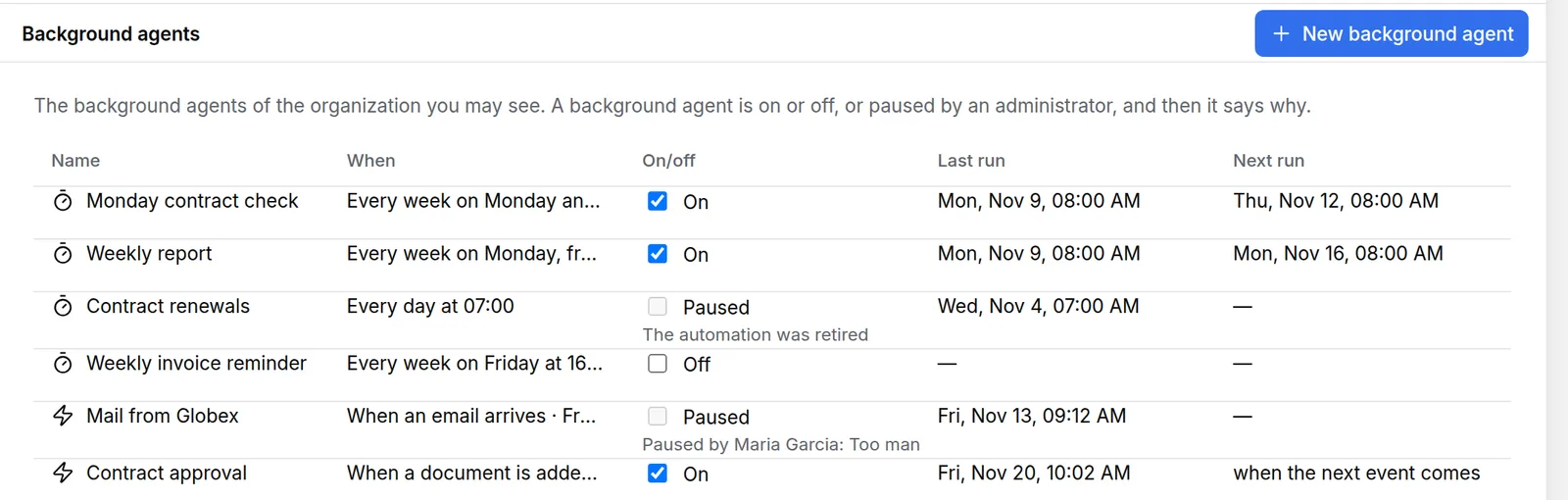
An action that worked can be kept as an automation and run again. Background agents start work by themselves: at a set time, such as the weekly report every Monday at 8:00, or when something happens, such as a contract added to a folder or an email from a customer. Administrators see every background agent in the organization and can pause it.
Background agents need a paid plan.
See it in the demo:
The engine runs the steps, not the AI
Workflows, automations and background agents are run by our engine, step by step as you set them up. An agent may do a step, such as writing a summary, but the engine decides what runs and in what order.
The engine waits as long as a step needs: for a date, for an event such as an email from a customer, for a person to finish a task, or for a person to review an agent's work. It waits on our servers, so you can sign out and come back days later.
You choose how freely a run goes: it asks you first, or it runs at once and lets you undo. The steps that can be undone run straight away, everything is marked as made by the agent, and one Undo takes the whole run back. Before a step that cannot be undone, the run stops for a person.
See it in the demo:
The same rules for everyone
People and agents work through the same operations, rights checks and audit log. An agent never reaches more than the person it works for, and your rules decide per action: Allow, Ask or Deny.
Nothing leaves without approval
Nothing leaves your organization without a person's approval or your rules, and any step can ask for approval. Before a step that cannot be undone, the run stops for a person: you or someone else.
See it in the demo:
Private work stays private
The desktop program works without agents. A cloud account turns them on. Your question goes to our cloud and the answer comes back. Your conversations with the AI stay on your computer.
A folder marked "Not for AI" is never read by the assistant or any agent.